# Share button using React, Web Share API and unsupported fallback
Writing · December 2020
URL: https://www.edgarlr.com/posts/share-button-using-web-share-api
Share Button Component built with React
The [Web Share API](https://www.w3.org/TR/web-share/) provides an easy way to trigger the native share menu.
## Before getting started
There're a few things we should know before start coding.
First, browser support, and this is probably its main problem. Web Share API doesn't have the greatest support yet.
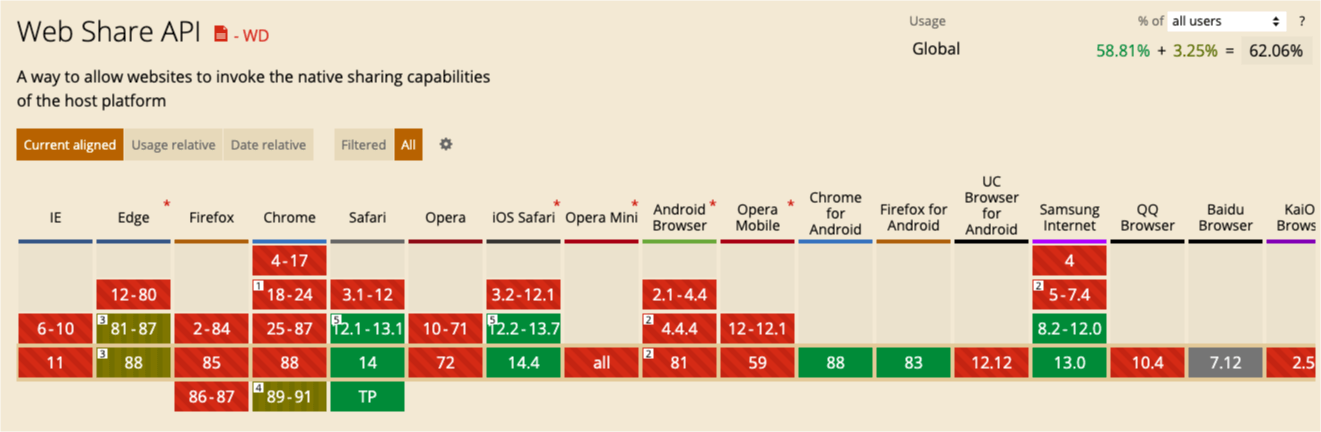
_Web Share API on [caniuse.com](https://caniuse.com/?search=share%20API)_
However, it's supported on the main mobile browsers and we can add a fallback option to all the unsupported browsers.
Apart from that, some other limitations are:
- It can only be used on sites served over HTTPS.
- It must be triggered in response to some user action such as click.
## Web Sharing API
To trigger the share menu we are gonna used the promise-based method `.share()`. But, as I said before and because is not fully supported, let's check if It's supported on the browser first.
```jsx
const onShareClick = (e) => {
e.preventDefault()
if (navigator.share) {
navigator
.share({
title: 'title',
text: 'Some message',
url: 'https://yourwebsite.com',
})
.catch(console.error)
}
}
```
Now, we can attached to the the onClick event of our component and pass the information via props.
```jsx
const ShareButton = ({ title, text, url }) => {
const onShareClick = (event) => {
event.preventDefault()
if (navigator.share) {
navigator
.share({
title: title,
text: text,
url: url,
})
.catch(console.error)
}
}
return
}
```
## Providing fallback
As I said earlier, let's add a second option for all the other browsers. On this case we'll add options for sharing on facebook, twitter and copy the url to the clipboard. Let's code that.
We can add a state and trigger it whenever `navigator.share` is unsupported.
```jsx
const ShareButton = ({ title, text, url }) => {
const [isShowed, setIsShowed] = useState(false)
const onShareClick = (e) => {
e.preventDefault()
if (navigator.share) {
navigator
.share({
title: title,
text: text,
url: url,
})
.catch(console.error)
} else {
setIsShowed((currentIsShowed) => !currentIsShowed)
}
}
return
}
```
Now, let's wrap our button into a div container and add the markup for the fallback.
```js
const ShareButton = ({title, text, url}) => {
// ...
return (
{isShowed ? (
) : null}
)
}
```
### Share on facebook
For facebook there actually a lot of ways to do it, but some options seem a bit overwhelming. You can give it a look if you want to, but in this case I don't want to add the sdk because I don't need to track all the shares from the page, so we are gonna do it by using `facebook.com/sharer`
```jsx
const ShareButton = ({title, text, url }) => {
// ...
const onFacebookShare = (e) => {
e.preventDefault()
window.open(
`https://www.facebook.com/sharer/sharer.php?u=${url}`,
'facebook-share-dialog',
'width=800,height=600'
)
}
return (
)
}
```
### Copy to the clipboard
And finally, we are gonna use the `navigator.clipboard` which is supported by most of the modern browsers.
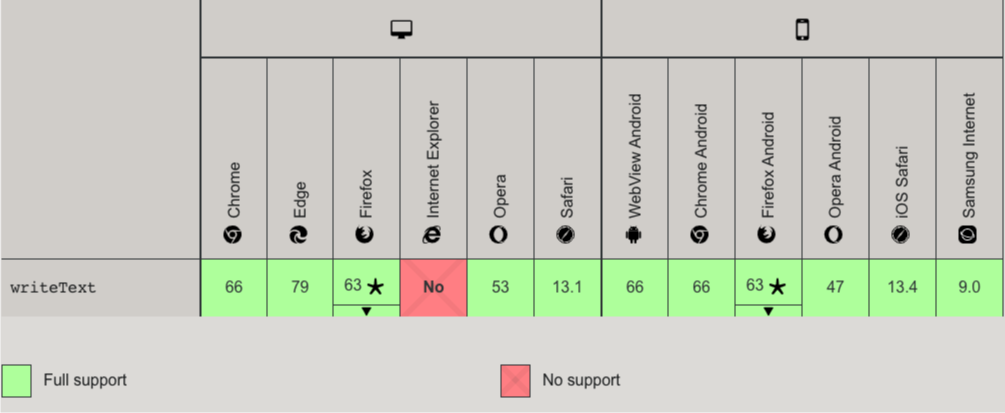
_`Navigator.Clipboard` support on [developr.mozilla.org](https://developer.mozilla.org/en-US/docs/Web/API/Clipboard_API)_
If you need support on internet explore you might want to explore other alternatives. For now, let's work with `navigator.clipboard` and add some type of feedback for the users to know when it's been copied.
```jsx
const ShareButton = ({title, text, url }) => {
const [isCopied, setIsCopied] = useState(false)
// ...
const onCopyToClipboard = (e) => {
e.preventDefault()
if (navigator.clipboard) {
navigator.clipboard
.writeText(url)
.then(() => setIsCopied(true))
.catch(console.error)
}
}
// Restarts the copy state after a few seconds
useEffect(() => {
if (!isCopied) return
const timer = setTimeout(() => {
setIsCopied(currentIsCopied => !currentIsCopied)
}, 3000)
return () => clearTimeout(timer)
}, [isCopied])
return (
{ /* ... */}
{isShowed ? (
{ /* ... */}
) : null}
)
}
```
Now, you only need to add some styles and that's it.
The full version of our component will look like this.
```jsx
const ShareButton = ({title, text, url }) => {
const [isShowed, setIsShowed] = useState(false)
const [isCopied, setIsCopied] = useState(false)
const onShareClick = (e) => {
e.preventDefault()
if (navigator.share) {
navigator.share({
title: title,
text: text,
url: url,
})
.catch(console.error)
} else {
setIsShowed(currentIsShowed => !currentIsShowed)
}
}
const onFacebookShare = (e) => {
e.preventDefault()
window.open(
`https://www.facebook.com/sharer/sharer.php?u=${url}`,
'facebook-share-dialog',
'width=800,height=600'
)
}
const onCopyToClipboard = (e) => {
e.preventDefault()
if (navigator.clipboard) {
navigator.clipboard
.writeText(url)
.then(() => setIsCopied(true))
.catch(console.error)
}
}
useEffect(() => {
if (!isCopied) return
const timer = setTimeout(() => {
setIsCopied(currentIsCopied => !currentIsCopied)
}, 3000)
return () => clearTimeout(timer)
}, [isCopied])
return (
)
}
```
### Usage
```jsx
```
### One last thing
You might already notice is gonna be a bit annoying having to write the full url each time we use the component. We can change this by using `window.location` and changing the `url` prop's name to `path`
```jsx
const ShareButton = ({ title, text, path }) => {
// Use a ternary for preventing bugs when is running on the server
const fullURL = window.location ? `${window.location.origin}${path}` : ''
// ...
return {
/* ... */
}
}
```
You'll need to replace all the `url` variables with `fullURL`
Now, we can use our component and only pass it the path.
```jsx
// You must use the leading slash for the path
```